
Nissan Primastar Radio Code Online Generator
Instant automated factory decoding for all Nissan Primastar commercial vans.
Nissan Primastar Code
Instant automated factory decoding
How to Locate Your Nissan Primastar Serial & Enter Code
Follow our 3-step illustrated instructions to retrieve your serial number and enter your genuine unlock PIN.

Press Buttons 1 & 6 Simultaneously
Turn on the radio. Press and hold preset buttons 1 and 6 together for 3 to 5 seconds to display the 4-character Pre-Code (e.g. T742) on the LCD.
Check Side Barcode Label if Screen Locked
If buttons 1 & 6 do not display the code, slide the radio forward using DIN release keys to read the Security Pre-Code ending the barcode line.
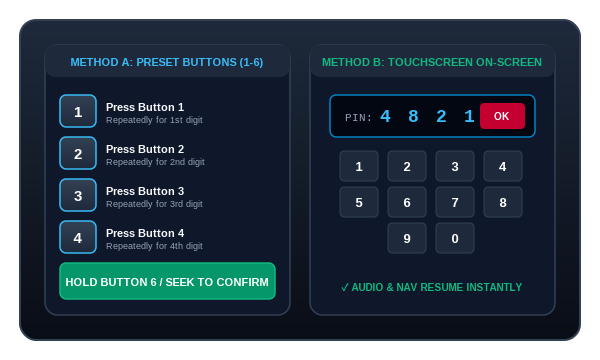
Enter Code via Presets or Stalk Control
Enter your 4 digits using the faceplate preset buttons 1–4 or the steering wheel thumbwheel, then hold button 6 to confirm and restore audio.
Nissan Primastar Radio Code Stereo Specifications
Our decoding system communicates with the official Nissan OEM authorization database. Review the technical parameters below to ensure complete compatibility with your head unit.
| Supported Models | Nissan Primastar X83, Primastar Combi, Primastar Panel Van |
|---|---|
| Fitted Headunits | Renault-Nissan OEM Tuner List / Update List CD Head Unit |
| Serial Types | Security Pre-Code (1 Letter + 3 Digits, e.g. T742), RN Serial |
| Code Format | 4-Digit Manufacturer Master Security PIN |
| Delivery Time | Instant Automated Database Decoding (<60 Seconds) |

Nissan Primastar Production Generations & Audio Systems
Identify your vehicle's exact generation, fitted factory audio unit, and whether dashboard removal is required to retrieve your serial number.
Nissan Primastar Phase 1 Single-DIN
Nissan Primastar Phase 2 & Facelift Double-DIN
Nissan Primastar Real Head Unit & Casing Label References
Verified customer reference database of authentic Nissan Nissan Primastar head units, on-screen diagnostic serial screens, and casing barcode stickers. Click any image or button to inspect in full HD.
Renault-Nissan Primastar R013-1DIN Label (05MAF9B0059)
05MAF9B0059
Genuine Renault-Nissan Alliance 1-DIN commercial van audio sticker with VPN VPDRSF19C102BM and metal chassis stamp VPDNMF-18A965-AC.
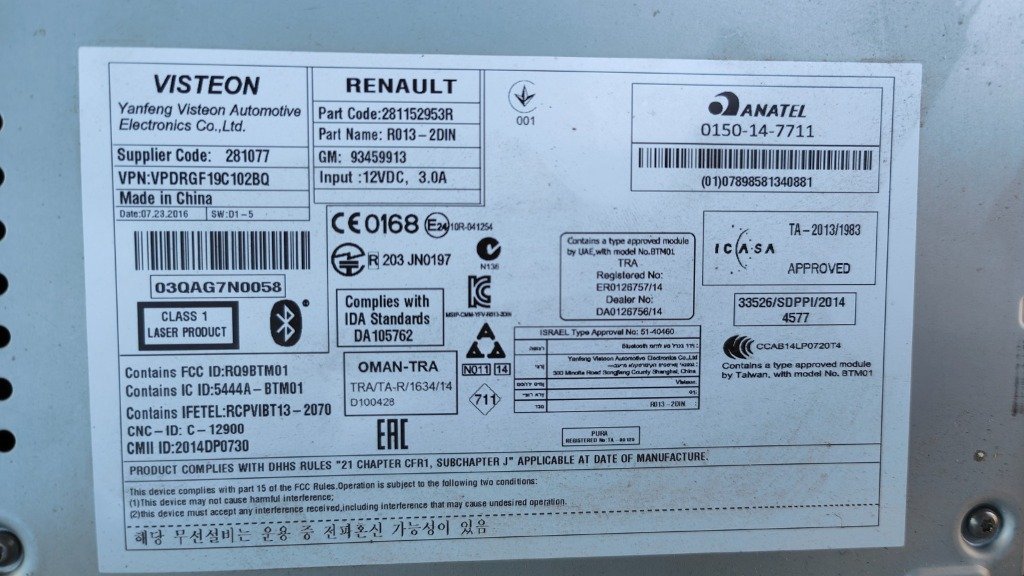
Renault-Nissan Alliance R013-2DIN Label (03QAG7N0058)
03QAG7N0058
Double-DIN commercial audio deck casing sticker showing GM 93459913, Supplier Code 281077, and VPN VPDRGF19C102BQ.
Primastar Commercial Lock Screen (Serial: 30CAL8U0054)
30CAL8U0054
Red illuminated digital lock screen showing 10-character serial 30CAL8U0054, Alliance part code 281856WX0A, and countdown penalty timer.

Nissan Primastar In-Dash Commercial Audio Unit
T742 / Pre-Code
Installed commercial dashboard audio head unit showing rotary volume control, station presets 1-6, and display.

Primastar Orange LCD Lock Screen (DW34N03358)
DW34N03358
High-contrast commercial amber/orange LCD display with anti-theft penalty timer and diagnostic serial DW34N03358.
Complete Nissan Primastar Radio Code & Security Guide
Recover your authentic Nissan Primastar radio code in under 60 seconds. Guaranteed factory master PIN calculation for commercial fleet van audio systems.
Nissan Primastar Commercial Van Audio Architecture
The Nissan Primastar commercial van was engineered under the Renault-Nissan Alliance platform partnership (shared with the Renault Trafic and Vauxhall Vivaro). Designed for tradespeople and delivery fleets, these vans feature robust 12V electrical systems.
When commercial van batteries are disconnected for heavy welding, alternator replacement, or flat battery jump-starting on cold mornings, the audio unit locks immediately displaying "CODE" or "0000". Entering the authentic 4-digit PIN restores the system without commercial vehicle dealership downtime.
Locating the Primastar Pre-Code On-Screen or Casing
You often do not need to pull the radio out of a Primastar dashboard. With the radio switched on, press and hold preset buttons 1 and 6 simultaneously for 3 to 5 seconds.
The LCD screen will switch to technical diagnostics and display a letter followed by three digits (for example: T742 or V128). This is your factory Security Pre-Code. Enter this 4-character code into our generator to calculate your 4-digit PIN.
Entering Code via Steering Column Stalk or Faceplate
You can enter the code using either the faceplate buttons or the steering column control stalk.
On the faceplate, press preset 1 for the 1st digit, preset 2 for the 2nd, preset 3 for the 3rd, and preset 4 for the 4th, then hold preset 6 for 3 seconds. Alternatively, rotate the thumbwheel behind the steering wheel stalk to select numbers and press the bottom button to advance.
Primastar Dual Battery Lockouts & Fleet Unlocking
If incorrect codes were submitted previously, the Primastar display shows "ERROR" followed by a countdown timer (e.g. 1m, 2m, 4m, up to 32m).
Leave the ignition key in the Accessory (ACC) position with the radio powered on until the screen changes from "ERROR" back to "CODE" or "0000". Do not disconnect the van battery, as that will prolong the delay.
Why Order Online Instead of Visiting a Nissan Main Dealer?
Traditional Nissan dealerships require booking an appointment several days in advance, driving to the dealership, presenting vehicle registration and V5 logbook ownership documents, and paying £35 to £65 ($50–$80) in diagnostic service fees. Our automated online service connects directly with factory databases to deliver the exact same original manufacturer PIN in under 60 seconds from the comfort of your home for just £9.99.
Nissan Primastar On-Screen Error Diagnostics & Solutions
If your audio head unit displays a lock error, warning message, or countdown timer, refer to the diagnostic guide below.
| Error Message | Diagnostic Meaning | Recommended Action |
|---|---|---|
| CODE / 0000 | Standard security prompt following commercial van battery disconnect. | Enter your 4-digit factory master code using radio presets 1–4, confirm with button 6. |
| ERROR (1) / ERROR (2) | Incorrect 4-digit code entered into the Primastar unit. | Wait for the brief penalty countdown to expire. Submit genuine factory master PIN. |
| ERROR (32) | Maximum failed attempts reached on Primastar EEPROM. | Leave ignition in ACC with stereo powered on for 32 continuous minutes. |
| OFF / LOCKED | Unit in protective thermal or voltage lock state. | Check van battery voltage and allow unit to power continuously on ACC. |
Nissan Primastar Radio Code FAQs
Answers to common questions about retrieving serial numbers and unlocking your Nissan Primastar.
Select Another Nissan Model or Radio
We decode security codes for every Nissan vehicle, commercial van, and factory audio manufacturer.