
Nissan Radio Codes Online
Instant Factory Master PIN Generator for All Nissan Models Worldwide
Nissan Radio Codes
Instant automated factory decoding
How to Locate Your Nissan Radio Codes Online Serial & Enter Code
Follow our 3-step illustrated instructions to retrieve your serial number and enter your genuine unlock PIN.
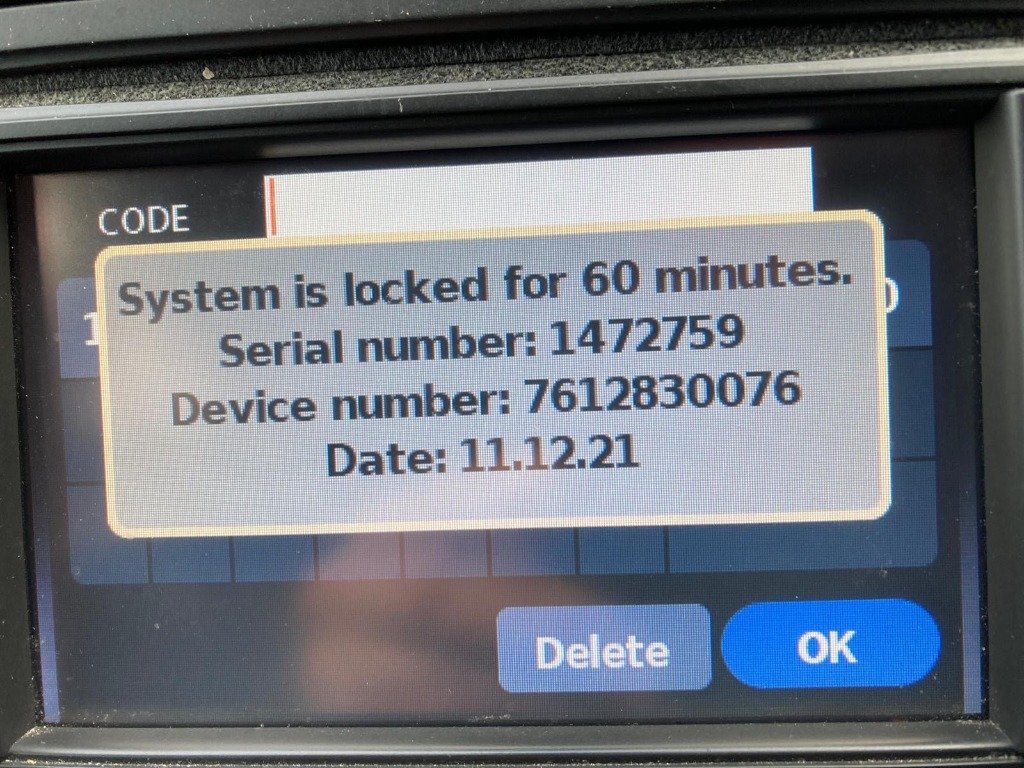
Screen Diagnostic or Casing Label
Retrieve serial on-screen for Bosch Connect and Visteon SEED units, or slide unit forward to read the barcode sticker on other models.
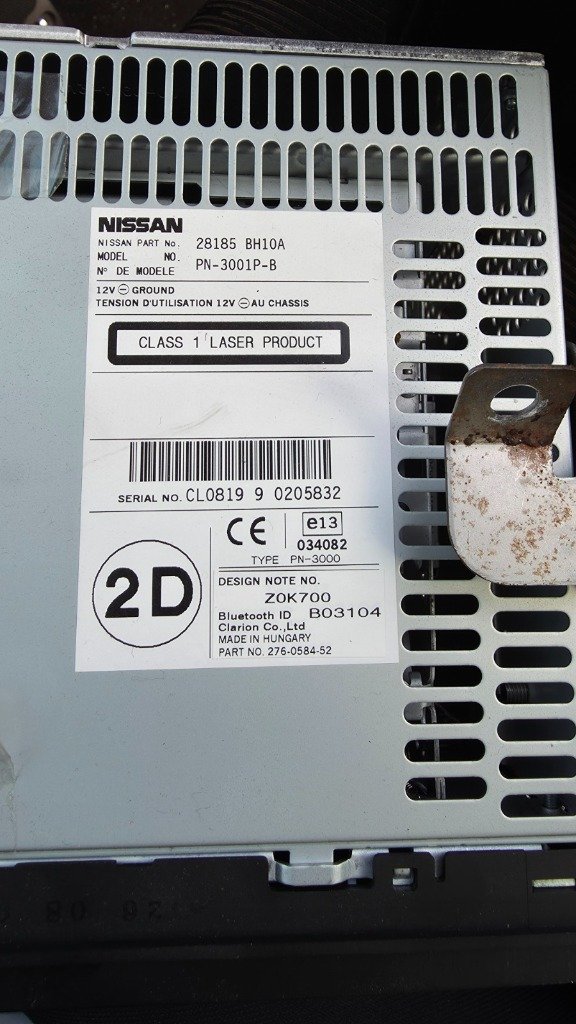
Submit Serial for Instant Generation
Enter your serial into our automated factory decoder to compute your authentic 4-digit PIN in under 60 seconds.
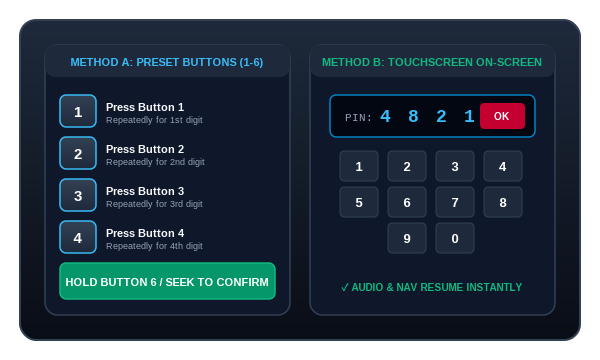
Enter Code & Enjoy Audio
Input your 4-digit code using the touchscreen keypad or station presets 1-4. Audio and Bluetooth resume immediately.
Nissan Radio Codes Online Stereo Specifications
Our decoding system communicates with the official Nissan OEM authorization database. Review the technical parameters below to ensure complete compatibility with your head unit.
| Manufacturer | Nissan Motor Co. OEM (Bosch, Clarion, Daewoo, Blaupunkt, Visteon) |
|---|---|
| Supported Models | 100% of Nissan factory audio and navigation head units |
| Code Format | 4-Digit Numeric PIN (0000 - 9999) |
| Delivery Time | Instant Automated (<60 Seconds) |
| Free Lifetime Retrieval | Included — Never pay again if you lose your code |
| Service Availability | 24 Hours a Day, 7 Days a Week, 365 Days a Year |
| Accuracy | 100% Genuine Factory Master Code |
| Guarantee | Unconditional 100% Money-Back Guarantee |

Nissan Radio Codes Online Production Generations & Audio Systems
Identify your vehicle's exact generation, fitted factory audio unit, and whether dashboard removal is required to retrieve your serial number.

Generation I: Classic Blaupunkt & Clarion Audio

Generation II: 6-CD Changers & Daewoo Bluetooth Tuners
Generation III: Nissan Connect Bosch Touchscreen Navigation

Generation IV: Cryptographic Visteon SEED Challenge Units
Nissan Radio Codes Online Real Head Unit & Casing Label References
Verified customer reference database of authentic Nissan Nissan Radio Codes Online head units, on-screen diagnostic serial screens, and casing barcode stickers. Click any image or button to inspect in full HD.

Nissan Connect Touchscreen Lock Screen (Serial: 2783546)
2783546
High-resolution photo of Nissan Connect Bosch LCN touchscreen showing 60-minute lock diagnostic screen with 7-digit serial 2783546, 10-digit device 7513750018, and date 13.07.04.
Nissan Connect Bosch Lock Screen (Serial: 1472759)
1472759
Genuine customer reference photo of Nissan Connect Bosch LCN touchscreen diagnostic display showing 7-digit serial 1472759, 10-digit device number 7612830076, and date code.
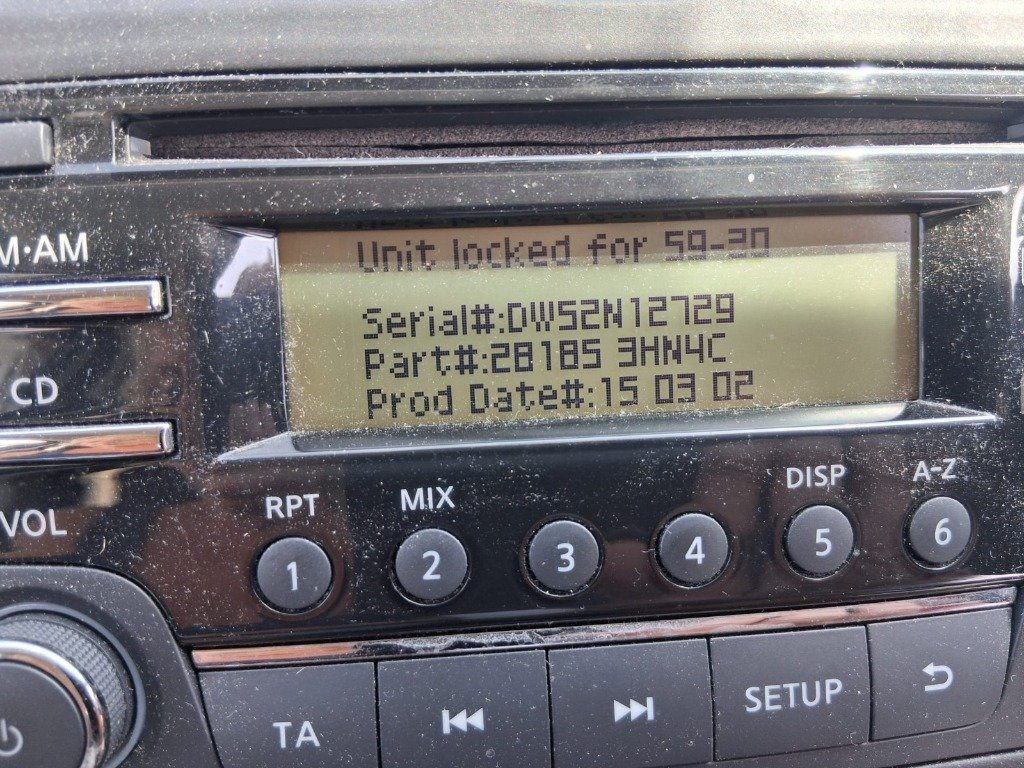
Nissan Daewoo Green LCD Lock Screen (DW52N12729)
DW52N12729
High-contrast green LCD screen displaying "Unit locked for 59:20", Serial DW52N12729, Part 28185 3HN4C, and production date without removing the radio.

Nissan Blaupunkt Factory Single-CD Radio (Ivory/Cream)
14-Digit BP Serial
Authentic customer photo of Nissan Blaupunkt factory single-CD tuner in classic ivory finish with dual rotary controls, preset buttons 1–5, and security code protection.

Nissan Clarion CY00E "CODE IN" Security Screen
CODE IN Prompt
Authentic customer in-car dashboard photo of Clarion CY00E / PN-3001 unit showing "CODE IN" security prompt on LCD display with preset buttons 1–6.

Nissan Clarion PN-3001P Casing Label (PN3001PA 0007042)
PN3001PA 0007042
Authentic customer label from Clarion Co., Ltd. Hungary. Displays circular badge 2B, Design Note HP-3488, Bluetooth ID B03104, and barcode serial PN3001PA 0007042.
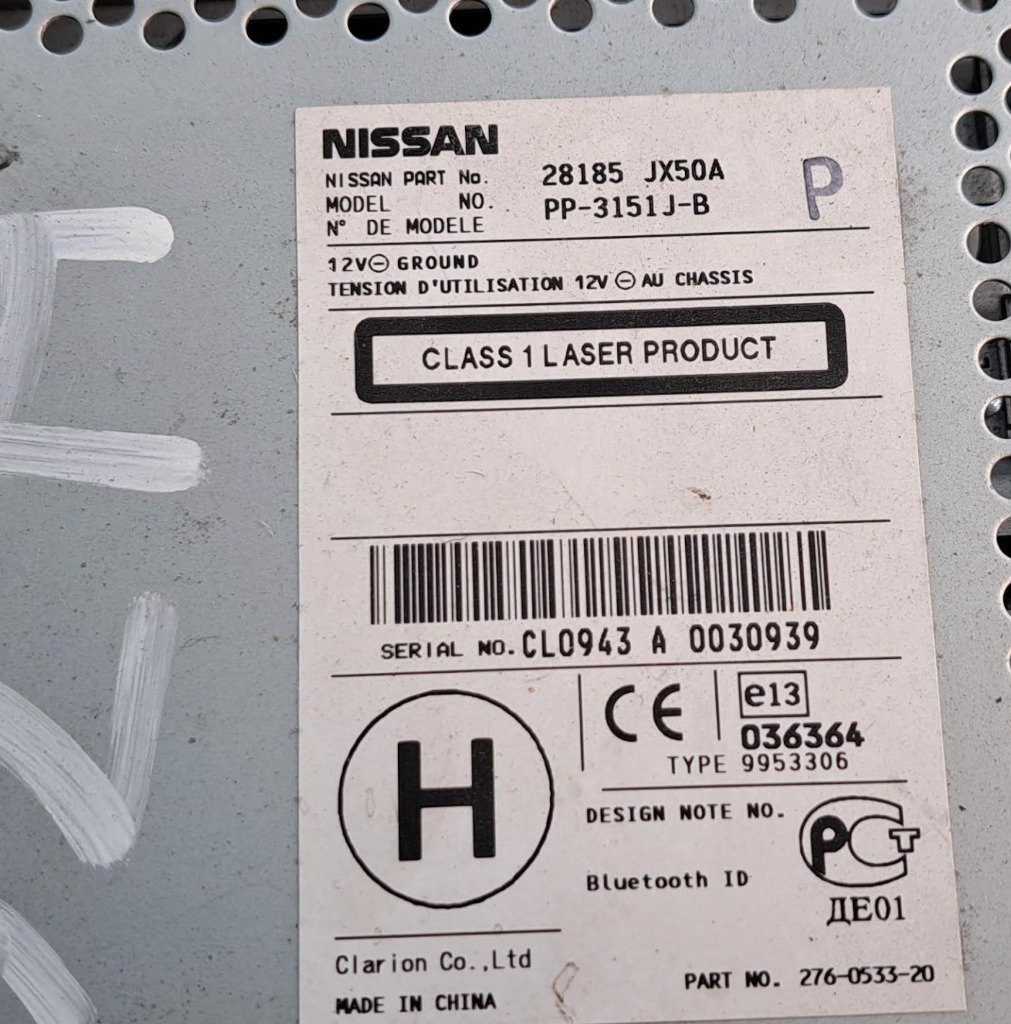
Nissan Clarion PP-3151J-B Casing Label (CL0943 A 0030939)
CL0943 A 0030939
Clarion PP-3151J-B sticker from Clarion China showing stamped "P", bold circle "H" badge, Part No. 276-0533-20, and barcode serial CL0943 A 0030939.

Visteon Cryptographic SEED Challenge Screen (Seed: 205521)
Seed: 205521
Dynamic anti-theft challenge screen displaying "Seed: 205521" and "Key: 000000" input prompt, ready for instant mathematical OEM PIN calculation.
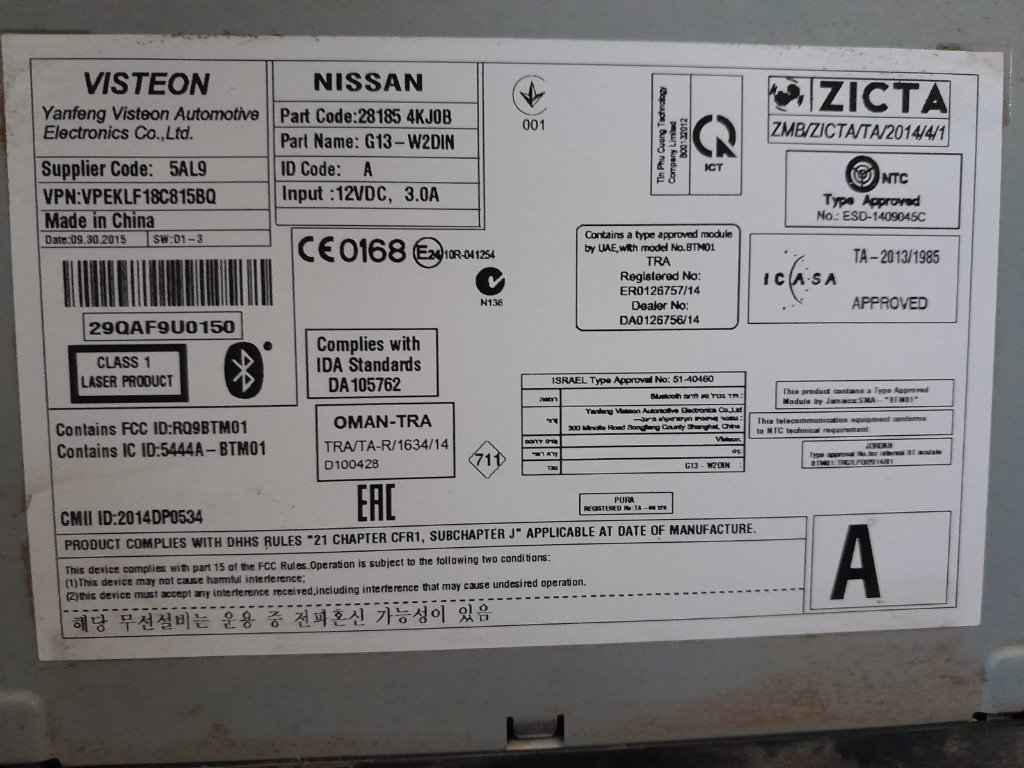
Nissan Visteon G13-W2DIN Label (29QAF9U0150)
29QAF9U0150
Official Yanfeng Visteon Automotive Electronics casing sticker with Supplier Code 5AL9, VPN VPEKLF18C815BQ, and large ID code A.
Nissan Daewoo Amber LCD Diagnostic Screen (DW34N03358)
DW34N03358
Amber/orange illuminated LCD screen displaying serial DW34N03358, part number, and penalty countdown timer.

Nissan Connect LCN Locked Display (5855948)
5855948
Bosch LCN touchscreen anti-theft lockout diagnostic screen showing 7-digit serial 5855948, device 7612830050, and system locked 60 minutes notice.
Complete Nissan Radio Codes Online Radio Code & Security Guide
Locked out of your Nissan audio or navigation system? Whether your vehicle is a Qashqai, Juke, Micra, Note, Navara, X-Trail, Primastar, NV200, Almera, or Tiida, we provide genuine Nissan factory master unlock codes online 24/7. From classic Blaupunkt and Clarion tuners to Daewoo AGC Bluetooth units, Visteon SEED cryptographic challenges, and Bosch Connect touchscreen navigation, our automated system calculates your authentic unlock PIN in under 60 seconds.
Understanding the Nissan Anti-Theft Security Protocol
Every factory audio and navigation head unit installed in Nissan vehicles is safeguarded by an anti-theft security protocol. When your vehicle undergoes battery replacement, alternator maintenance, jump-starting, or blown fuse repairs, continuous 12V keep-alive power to the stereo is severed.
Upon reconnecting power, the stereo enters anti-theft lockout mode to protect against vehicle theft. The unit displays "RADIO CODE", "CODE ----", or "SYSTEM IS LOCKED", requiring the vehicle's original 4-digit security PIN to reactivate.
You do not need to book an expensive main dealership appointment or wait days for physical code cards. Our automated system generates genuine factory master codes 24/7 in under 60 seconds.
The Two Official Methods to Obtain Your Serial Number
Depending on your specific audio model, obtaining your serial number follows one of two straightforward paths:
Method A (Touchscreen Connect & SEED): Turn ignition to ACC. For Connect units, enter 3 random codes to display the 7-digit Serial, Device Number, and Date on screen. For Visteon SEED units, hold buttons 1 & 6 for 3 seconds to display the SEED code. No tools required!
Method B (Clarion, Daewoo, Blaupunkt): Gently pry off the center console trim using a plastic pry tool, remove the four mounting screws, and slide the radio forward to inspect the barcode sticker and stamped serial on the metal casing.
Cross-Referencing Official Nissan Factory Databases
Enter your serial number into the decoder field above. Our automated platform immediately routes your query through official manufacturer algorithms and assembly records.
Whether your unit requires a Bosch cryptographic hash, a Daewoo EEPROM lookup, a Clarion calculation, or a Blaupunkt matrix match, your authentic 4-digit unlock code is computed instantly.
Your master PIN is presented directly on your screen and dispatched to your email address with an official downloadable code certificate.
How to Input Your Unlock PIN and Clear Security Timers

For Touchscreen Models (Nissan Connect): Tap your 4-digit PIN directly into the on-screen keypad and press "OK" in the bottom-right corner. The system validates the code and boots up immediately.
For Button/Keypad Models (Clarion, Daewoo, Blaupunkt): Press preset button 1 repeatedly for digit 1, preset button 2 repeatedly for digit 2, preset button 3 for digit 3, and preset button 4 for digit 4. Confirm by pressing SEEK/TRACK, preset button 6, or the up arrow (^).
If your screen displays "WAIT 60 MIN" or "Unit locked for 59:20", the unit is in security penalty mode due to prior incorrect entries. Leave the vehicle ignition switched to ACC with the radio on for 60 consecutive minutes without interruption until the countdown resets.
Why Order Online Instead of Visiting a Nissan Main Dealer?
Traditional Nissan dealerships require booking an appointment several days in advance, driving to the dealership, presenting vehicle registration and V5 logbook ownership documents, and paying £35 to £65 ($50–$80) in diagnostic service fees. Our automated online service connects directly with factory databases to deliver the exact same original manufacturer PIN in under 60 seconds from the comfort of your home for just £9.99.
Nissan Radio Codes Online On-Screen Error Diagnostics & Solutions
If your audio head unit displays a lock error, warning message, or countdown timer, refer to the diagnostic guide below.
| Error Message | Diagnostic Meaning | Recommended Action |
|---|---|---|
| WAIT 60 MIN / WAIT | Security lockout cooldown timer active after 3 failed attempts. | Leave the vehicle ignition switched to ACC with the radio powered on for 60 consecutive minutes without interruption until the prompt resets. |
| SYSTEM IS LOCKED | Nissan Connect security summary screen activated. | Note down the Serial Number (7 digits), Device Number (10 digits), and Date displayed on screen, and enter those three values into our decoder. |
| UNIT LOCKED FOR 59:20 | Nissan Daewoo AGC anti-theft penalty timer counting down. | Keep the ignition key in ACC position until the timer reaches 00:00. Enter your authentic 4-digit PIN calculated from the DW serial. |
| RADIO CODE / CODE ---- | Awaiting 4-digit factory unlock PIN. | Enter the 4-digit master PIN generated by our automated decoder to unlock the stereo immediately. |
| SECURE (GREEN / RED) | Nissan Anti-Theft System (NATS) immobiliser mismatch or communication loss. | Check audio fuses in the cabin fusebox and harness grounding. Donor radios swapped from another car may require Nissan Consult diagnostic pairing. |
Nissan Radio Codes Online Radio Code FAQs
Answers to common questions about retrieving serial numbers and unlocking your Nissan Radio Codes Online.
Select Another Nissan Model or Radio
We decode security codes for every Nissan vehicle, commercial van, and factory audio manufacturer.