
Nissan Navara Radio Code Online Generator
Instant automated factory decoding for all Nissan Navara models (D40 & D23 NP300).
Nissan Navara Code
Instant automated factory decoding
How to Locate Your Nissan Navara Serial & Enter Code
Follow our 3-step illustrated instructions to retrieve your serial number and enter your genuine unlock PIN.
Read Screen Code or Inspect Clarion Chassis
For Navara Connect touchscreens, view numbers on screen after 3 failed attempts. For Clarion 6-CD changers, inspect the white label behind the center fascia.
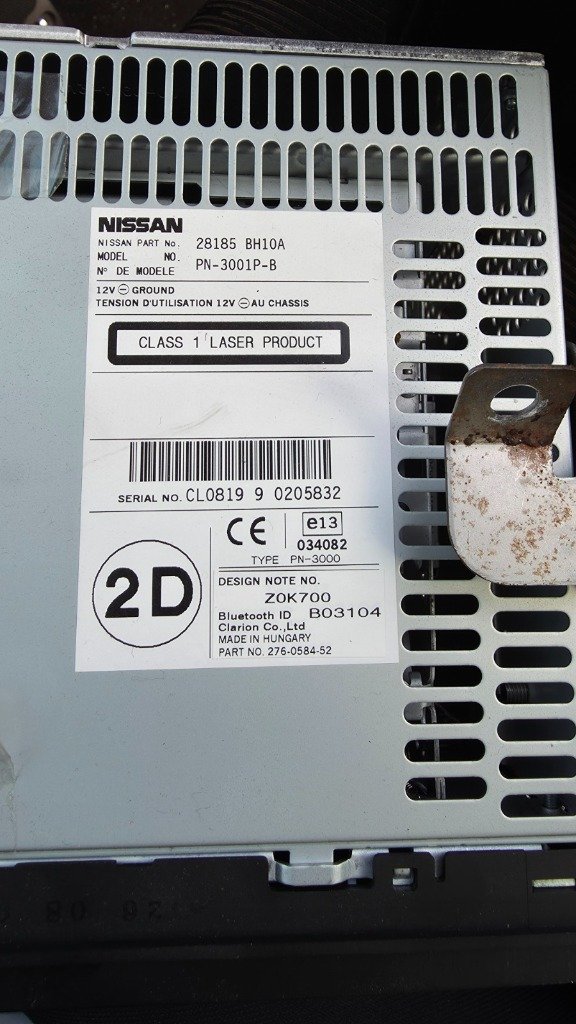
Find CL... or PP... Serial Code
Locate the 14-character serial stamped into the casing beginning with CL (e.g. CL081690089208) or PP (e.g. PP3001MB008912) and model code CY01E.
Enter Code & Hold Seek Up (^) Button
Use preset buttons 1–4 to enter the 4 digits, then press and hold Seek Up (^) or preset 6 for 2 seconds. Full 6-CD changer audio resumes immediately.
Nissan Navara Radio Code Stereo Specifications
Our decoding system communicates with the official Nissan OEM authorization database. Review the technical parameters below to ensure complete compatibility with your head unit.
| Supported Models | Nissan Navara D40 (2005-2015), Navara D23 NP300, Pathfinder R51 |
|---|---|
| Fitted Headunits | Clarion CY01E, Clarion PP-3001M 6-CD, Nissan Connect Touchscreen |
| Serial Formats | CL 14-Digit (CL081690089208), PP 14-Digit, 7-Digit Screen (9596739) |
| PIN Format | 4-Digit Manufacturer Security Code |
| Delivery Time | Instant Automated Database Decoding (<60 Seconds) |

Nissan Navara Production Generations & Audio Systems
Identify your vehicle's exact generation, fitted factory audio unit, and whether dashboard removal is required to retrieve your serial number.

Nissan Navara D40 (MK2)

Nissan Navara D23 / NP300 (MK3)
Complete Nissan Navara Radio Code & Security Guide
Recover your authentic Nissan Navara radio code in under 60 seconds. Guaranteed factory master PIN calculation for all Clarion CY/PP and Bosch Connect systems.
Navara D40 & NP300 D23 Utility Pickup Lockout Protocols

The Nissan Navara pickup truck is engineered for demanding commercial, off-road, and towing duties. Equipped with high-output alternators and dual battery isolators for winches and towbars, power interruptions are frequent during battery maintenance or winter jump-starts.
When battery voltage is severed, the factory audio head unit (Clarion in-dash 6-CD changer or Nissan Connect touchscreen) initiates anti-theft lockdown mode, displaying "CODE" or "ENTER PIN" and muting all speaker outputs.
Locating Clarion CY01E & PP-3001M 14-Digit Stamped Serials

On Navara D40 pickups fitted with the classic in-dash 6-CD changer (Clarion CY01E, CY06D, or PP-3001M), the serial number is permanently stamped into the side sheet metal and printed on the top white barcode sticker.
The serial is 14 characters long and starts with CL (e.g. CL081690089208) or PP (e.g. PP3001MB008912). To access the label, gently pry up the rubber mat in the upper dashboard storage tray, remove the single Philips screw, and tilt the fascia forward.
Entering the Master Code into Navara Clarion 6-CD Tuners
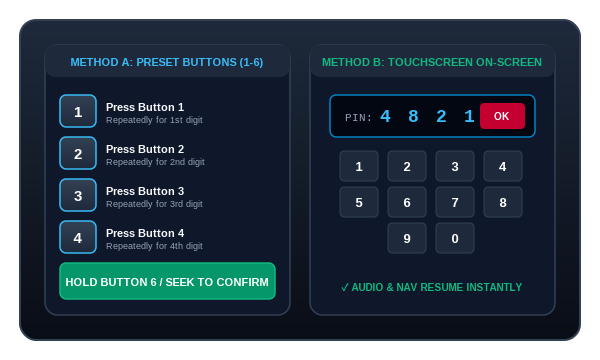
To enter your 4-digit code into a Navara Clarion head unit, use radio preset buttons 1 through 4.
Press button 1 repeatedly for the first digit, button 2 for the second, button 3 for the third, and button 4 for the fourth. Once your 4-digit code is visible on the LCD, press and hold the Seek Up (^) button or preset 6 for 2 seconds to confirm.
Navara Immobilizer Interlock & "SECURE" Display Troubleshooting
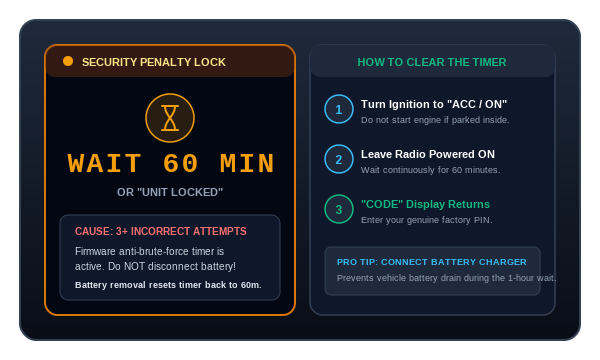
If your Navara display shows "SECURE" on a green or yellow background rather than asking for "CODE", this indicates an interruption in the NATS (Nissan Anti-Theft System) CAN-bus handshake between the stereo and the engine ECU.
First, verify the 15A audio fuse in the cabin fuse box. Next, ensure your vehicle key battery has adequate charge. If the display shows "WAIT 60 MIN", leave the ignition in ACC with the unit powered on for 60 continuous minutes to clear the penalty timer.
Why Order Online Instead of Visiting a Nissan Main Dealer?
Traditional Nissan dealerships require booking an appointment several days in advance, driving to the dealership, presenting vehicle registration and V5 logbook ownership documents, and paying £35 to £65 ($50–$80) in diagnostic service fees. Our automated online service connects directly with factory databases to deliver the exact same original manufacturer PIN in under 60 seconds from the comfort of your home for just £9.99.
Nissan Navara On-Screen Error Diagnostics & Solutions
If your audio head unit displays a lock error, warning message, or countdown timer, refer to the diagnostic guide below.
| Error Message | Diagnostic Meaning | Recommended Action |
|---|---|---|
| CODE / ENTER CODE | Standard security prompt following 12V battery power interruption. | Enter your 4-digit factory master code using radio presets 1–4, confirm with Seek Up (^). |
| INCORRECT / CODE ERR | An invalid 4-digit security code was entered into the Clarion or Connect unit. | Check your 14-digit CL serial or 7-digit screen code and submit authentic master PIN. |
| WAIT / WAIT 60 MIN | Anti-tamper penalty countdown triggered after 3 failed PIN attempts. | Leave ignition key in ACC with stereo powered on for 60 continuous minutes. |
| SECURE (GREEN / RED BAR) | NATS immobilizer bus communication interruption following battery swap. | Check 15A audio fuse in cabin fuse box and re-cycle ignition with original chipped key. |
Nissan Navara Radio Code FAQs
Answers to common questions about retrieving serial numbers and unlocking your Nissan Navara.
Select Another Nissan Model or Radio
We decode security codes for every Nissan vehicle, commercial van, and factory audio manufacturer.