
Daewoo Radio Codes Online Generator
Instant factory master unlock codes for all Daewoo, Nissan-Daewoo AGC-0070 & AGC-0071 Bluetooth head units.
Daewoo Radio Code
Instant automated factory decoding
How to Locate Your Daewoo Radio Codes Online Serial & Enter Code
Follow our 3-step illustrated instructions to retrieve your serial number and enter your genuine unlock PIN.
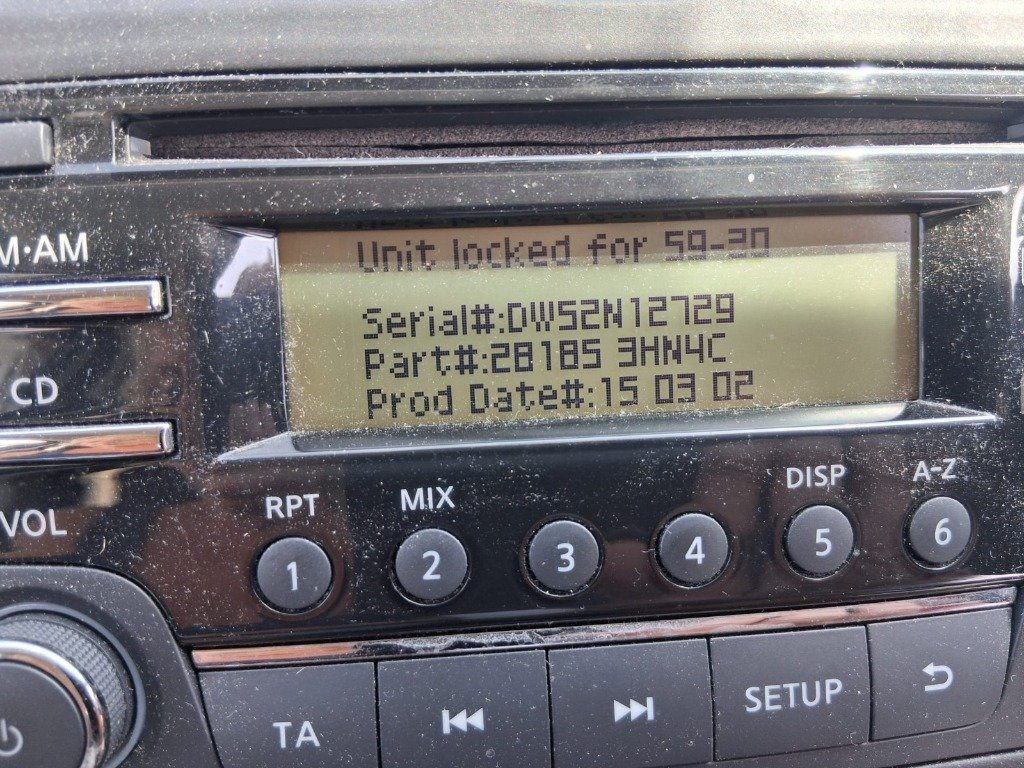
View DW Serial Directly On LCD Screen
Enter 3 incorrect PINs to trigger the built-in diagnostic screen showing your 10-digit DW serial number (Serial#: DW52N12729), Part Number (Part#: 28185 3HN4C), and Prod Date (15 03 02) without removing the radio.
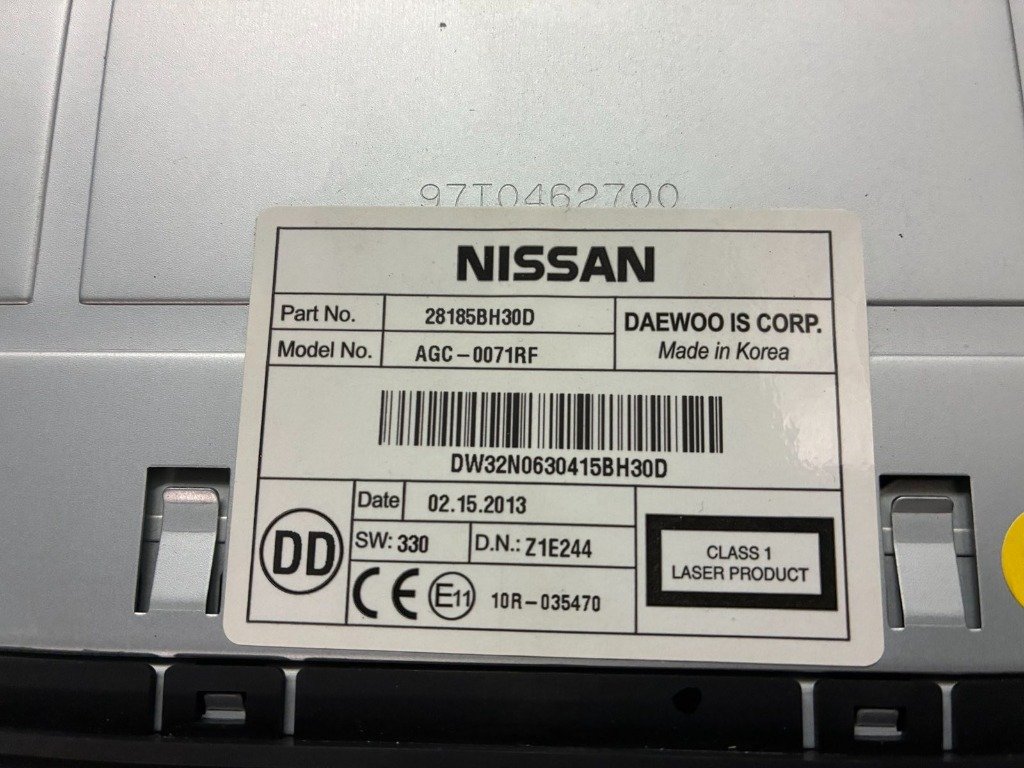
Locate DW / DS / HY Serial on Casing Label
Alternatively, if your display does not show the diagnostic screen, ease the center dash fascia forward to inspect the white Daewoo IS Corp sticker on top of the metal casing (e.g. DW32N06304 or DS19N19993).

Enter PIN via Preset Buttons 1-4
Press button 1 for 1st digit, button 2 for 2nd digit, button 3 for 3rd, button 4 for 4th. Press and hold button 6 or the rotary ENTER dial for 3 seconds to confirm.
Daewoo Radio Codes Online Stereo Specifications
Our decoding system communicates with the official Nissan OEM authorization database. Review the technical parameters below to ensure complete compatibility with your head unit.
| Manufacturer | Daewoo IS (Automotive OEM Nissan) |
|---|---|
| Model Codes | AGC-0070RF, AGC-0071RF, AGC-3220YF, 28185BH30A, 28185 3HN4C, 28185 3NF0C |
| Serial Format | 10-Character Alphanumeric (DW..., DS..., HY..., HP...) |
| Code Format | 4-Digit Master PIN (0000–9999) |
| Delivery Speed | Instant Automated Database Decoding (<60s) |
| Guarantee | 100% Guaranteed Master PIN & Free Lifetime Retrieval |
Daewoo Radio Codes Online Production Generations & Audio Systems
Identify your vehicle's exact generation, fitted factory audio unit, and whether dashboard removal is required to retrieve your serial number.
Daewoo AGC-0070RF / AGC-0071RF (Single-CD)

Daewoo AGC-3220YF-B (Late Upgrade Series)

Daewoo Amber LCD Diagnostic Screen
Daewoo Radio Codes Online Real Head Unit & Casing Label References
Verified customer reference database of authentic Nissan Daewoo Radio Codes Online head units, on-screen diagnostic serial screens, and casing barcode stickers. Click any image or button to inspect in full HD.
Daewoo Green LCD Lock Screen (DW52N12729)
DW52N12729
On-screen diagnostic display showing 10-digit serial DW52N12729, Part# 28185 3HN4C, and countdown lockout timer.
Daewoo AGC-0071RF Casing Label (DW32N)
DW32N0630415BH30D
Official factory white casing barcode sticker from Daewoo IS Corp with SW 330 and Model AGC-0071RF.

Daewoo Amber LCD Diagnostic Screen (DW4BN13748)
DW4BN13748
On-screen diagnostic screen displaying serial DW4BN13748, Part# 28185 3HN4C, and 59:45 countdown lockout.
Daewoo AGC-3220YF-B Casing Label (HY66N)
HY66N00680153HN4C
Late production AGC-3220YF-B series sticker with HY66N prefix and Class 1 laser product certification.
Nissan Daewoo Head Unit Fascia in Dashboard
AGC-0071 Front Controls
Complete front dashboard view of the Daewoo audio unit showing preset buttons 1–6, volume dial, CD slot, and setup controls.
Daewoo Orange LCD Screen Display (DW34N03358)
DW34N03358
Orange backlight LCD showing "Unit locked for 58-25" with serial DW34N03358 and Part# 28185 3NF0C.

Daewoo AGC-0071RF Early Production Label (DW22N)
DW22N1653120BH30D
2012 factory barcode label with DW22N serial prefix, SW 330 firmware, and Daewoo IS Corp manufacturing stamp.

Daewoo European Verrouillée Screen (HP92N00190)
HP92N00190
Multilingual European firmware screen showing "Verrouillée pour 59-48" with HP92N serial and 28027 5FA0B part number.

Daewoo AGC-3220YF-B DW Serial Label (DW38N)
DW38N09675083HN4B
AGC-3220YF-B casing sticker featuring 281853HN4B Nissan part number and DW38N barcode serial.

Daewoo AGC-0071RF 2015 Edition Label (DW57N)
DW57N1420431BH30D
Late 2015 production label with DW57N serial prefix and E11 automotive homologation stamp.

Daewoo AGC-0071RF DS Serial Label (DS19N)
DS19N1999329BH30D
Original 2011 casing sticker demonstrating the DS serial number format (DS19N...) supported by our decoder.
Complete Daewoo Radio Codes Online Radio Code & Security Guide
Lost your Daewoo radio code after replacing the vehicle battery, an alternator repair, or a dead 12V terminal? Our automated factory database calculates your authentic 4-digit OEM master PIN in under 60 seconds. 100% on-screen serial retrieval supported with zero dealership costs and zero dashboard dismantling.
Daewoo AGC-0070 Series Architecture & Vehicle Fitment
The Daewoo AGC-0070RF, AGC-0071RF, and AGC-3220YF are factory-fitted audio systems found in millions of Nissan vehicles including the Qashqai, Juke, Note, Micra, and NV200 commercial vans.
Featuring integrated Bluetooth audio streaming and hands-free calling, the unit utilizes an encrypted anti-theft EEPROM microchip. When battery power drops below 10 volts or the battery is replaced, the unit locks to prevent unauthorized transfer between vehicles.
Finding the DW, DS or HY Serial Number On Screen & Casing
On most 2011 and newer Nissan vehicles, entering 3 incorrect PINs will cause the display to show "Unit locked for 60:00" followed by the 10-character serial starting with DW (e.g. DW52N12729 or DW4BN13748) and the Nissan part number (28185 3HN4C).
If your unit does not display the serial on-screen, gently unclip the plastic center fascia trim and remove four Torx T20 screws. The serial number is printed clearly on the top white barcode sticker next to the supplier code 276 660.
Step-by-Step PIN Entry Instructions for Daewoo Head Units
Once your authentic 4-digit code is calculated, enter it into the Daewoo stereo using the 1 through 4 radio preset buttons on the faceplate.
Press button 1 repeatedly until the first digit of your code appears. Press button 2 for the second digit, button 3 for the third digit, and button 4 for the fourth digit. When all four digits are displayed correctly, press and hold Preset Button 6 or the Rotary ENTER knob for 3 seconds.
Resolving "Unit locked for 59-XX" & Daewoo Penalty Lockout Countdown
Entering an incorrect code will display "Unit locked for 59-20" or "CODE ERR" followed by a progressive penalty countdown timer. After 3 attempts, the stereo locks for 1 minute; after 6 attempts, for 10 minutes; and after 10 attempts, for 60 minutes.
To clear the timer, leave the car ignition in the ACC position with the radio powered on. Do not disconnect the battery cables, as this will reset the penalty timer and prolong the lock.
Why Order Online Instead of Visiting a Nissan Main Dealer?
Traditional Nissan dealerships require booking an appointment several days in advance, driving to the dealership, presenting vehicle registration and V5 logbook ownership documents, and paying £35 to £65 ($50–$80) in diagnostic service fees. Our automated online service connects directly with factory databases to deliver the exact same original manufacturer PIN in under 60 seconds from the comfort of your home for just £9.99.
Daewoo Radio Codes Online On-Screen Error Diagnostics & Solutions
If your audio head unit displays a lock error, warning message, or countdown timer, refer to the diagnostic guide below.
| Error Message | Diagnostic Meaning | Recommended Action |
|---|---|---|
| RADIO CODE / CODE | Standard security prompt following 12V battery power loss. | Enter your 4-digit factory master code using radio preset buttons 1–4, confirm with button 6. |
| CODE ERR (1) | First incorrect PIN attempt recorded in Daewoo flash memory. | Wait 10 seconds for the prompt to return. Double-check your serial number. |
| Unit locked for 59-XX / WAIT | Multiple failed attempts triggered anti-tamper penalty countdown delay. | Leave ignition in ACC with radio on for 15 to 60 minutes until prompt resets. |
| LOCKED / CALL DEALER | Maximum failed attempts reached on Daewoo firmware. | Power unit continuously on ACC for a full 60 minutes with battery charger connected. |
Daewoo Radio Codes Online Radio Code FAQs
Answers to common questions about retrieving serial numbers and unlocking your Daewoo Radio Codes Online.
Select Another Nissan Model or Radio
We decode security codes for every Nissan vehicle, commercial van, and factory audio manufacturer.