

Nissan Blaupunkt Radio Code Online Generator
Instant automated factory decoding for all Nissan Blaupunkt BP series head units.
Nissan Blaupunkt Code
Instant automated factory decoding
How to Locate Your Nissan Blaupunkt Serial & Enter Code
Follow our 3-step illustrated instructions to retrieve your serial number and enter your genuine unlock PIN.

Slide Radio Forward Using DIN Keys
Insert 2 U-shaped DIN release prongs into the 4 holes on the radio faceplate corners until they click, then pull the stereo forward out of the dash cage.

Locate 14-Digit Serial Stamped Into Metal
The serial number is stamped directly into the sheet metal side casing starting with BP (e.g. BP237534082298) and printed on the paper barcode label.
Enter Code & Press Seek Up (^) Button
Use preset buttons 1–4 to cycle the digits, then confirm by pressing the Seek Up (^) arrow button on the right control dial. Audio playback resumes immediately.
Nissan Blaupunkt Radio Code Stereo Specifications
Our decoding system communicates with the official Nissan OEM authorization database. Review the technical parameters below to ensure complete compatibility with your head unit.
| Manufacturer | Blaupunkt GmbH (OEM Nissan Germany) |
|---|---|
| Model Types | MM CD-G, Nissan Micra K12 Radio, Almera N16 Tuner |
| Serial Format | 14-Digit Stamped (BP237534082298) + Part No (7 642...) |
| Code Format | 4-Digit Manufacturer Security Code |
| Delivery Time | Instant Automated Database Decoding (<60 Seconds) |

Nissan Blaupunkt Production Generations & Audio Systems
Identify your vehicle's exact generation, fitted factory audio unit, and whether dashboard removal is required to retrieve your serial number.
Blaupunkt MM CD-G (Micra K12 / Note)
Blaupunkt Radio Cassette / CD (Almera / Note)
Nissan Blaupunkt Real Head Unit & Casing Label References
Verified customer reference database of authentic Nissan Nissan Blaupunkt head units, on-screen diagnostic serial screens, and casing barcode stickers. Click any image or button to inspect in full HD.
Nissan Blaupunkt Factory Single-CD Radio (Ivory/Cream)
14-Digit BP Serial
Authentic Nissan Blaupunkt factory single-CD player in classic ivory/beige finish fitted to Nissan Micra K12, Note, and Almera. Features dual circular control dials and preset buttons 1–5.
Nissan Blaupunkt 14-Digit Stamped Serial on Metal Casing
BP237534082298
Laser-engraved 14-character serial number stamped permanently into the galvanized side sheet metal chassis, starting with BP.
Nissan Micra K12 Blaupunkt Removal & DIN Key Release
BP Series Removal
Extracting the Blaupunkt radio chassis using U-shaped DIN release keys inserted into the 4 corner faceplate holes.
Complete Nissan Blaupunkt Radio Code & Security Guide
Recover your authentic Nissan Blaupunkt radio code in under 60 seconds. Guaranteed factory master PIN calculation for all 14-digit BP serial numbers.
Blaupunkt BP Factory Tuner Architecture & Security
German manufacturer Blaupunkt supplied OEM headunits for millions of Nissan vehicles including the Micra K12, Note E11, and Almera N16. Known for robust analog tuners and dual rotary knobs, these units feature an internal non-volatile EEPROM security chip.
Whenever vehicle battery voltage drops below 10.5V or the battery is replaced, the unit locks and shows "CODE ----". Entering the authentic 4-digit PIN restores the EEPROM security state and permanently unlocks audio playback.
Finding the 14-Digit Stamped BP Serial Number
Because Blaupunkt stereos do not feature a digital screen diagnostic mode, the unit must be slid forward from the dashboard to read the serial number.
The serial is permanently engraved into the sheet metal side casing so it cannot be scrubbed off or lost. It begins with BP followed by 12 characters (e.g. BP237534082298). It is also printed on the paper barcode label on top of the casing.
Entering the Code Using Blaupunkt Preset Buttons
To enter your code into a Blaupunkt stereo, use the 1, 2, 3, and 4 radio preset buttons located along the lower faceplate.
Press button 1 repeatedly until your first digit appears. Press button 2 for the second digit, button 3 for the third digit, and button 4 for the fourth digit. Once all four numbers match your PIN, press the Seek Up (^) arrow button to confirm.
Clearing Blaupunkt "WAIT 1 HR" / "---" Screen Lockout
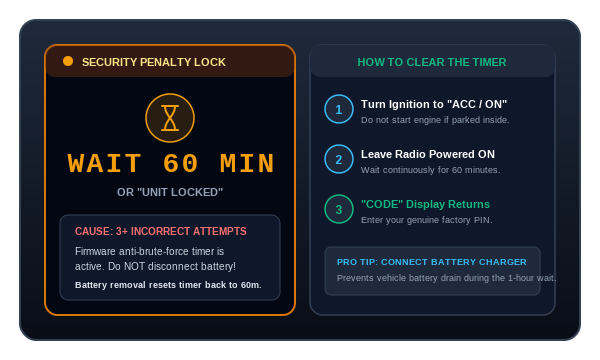
If incorrect codes were submitted previously, the Blaupunkt firmware displays "WAIT 1 HR" or three blank dashes "---".
Turn the ignition key to position 1 (ACC) and leave the radio powered on for 60 continuous minutes. Disconnecting the battery resets the timer back to zero, prolonging the lock.
Why Order Online Instead of Visiting a Nissan Main Dealer?
Traditional Nissan dealerships require booking an appointment several days in advance, driving to the dealership, presenting vehicle registration and V5 logbook ownership documents, and paying £35 to £65 ($50–$80) in diagnostic service fees. Our automated online service connects directly with factory databases to deliver the exact same original manufacturer PIN in under 60 seconds from the comfort of your home for just £9.99.
Nissan Blaupunkt On-Screen Error Diagnostics & Solutions
If your audio head unit displays a lock error, warning message, or countdown timer, refer to the diagnostic guide below.
| Error Message | Diagnostic Meaning | Recommended Action |
|---|---|---|
| CODE ---- | Standard Blaupunkt security prompt following 12V battery power interruption. | Use preset buttons 1–4 to enter your 4-digit code, confirm with Seek Up (^). |
| WAIT 1 HR / --- | Firmware anti-tamper penalty active after 3 failed PIN attempts. | Leave ignition in ACC with radio powered on for 60 uninterrupted minutes. |
| ERROR / CODE ERR | An incorrect 4-digit code was submitted to the Blaupunkt unit. | Verify your stamped BP serial number and submit authentic factory master code. |
| OFF / BLOCKED | Unit locked out awaiting continuous power-on timer reset. | Power unit on ACC for 1 full hour with a battery charger connected. |
Nissan Blaupunkt Radio Code FAQs
Answers to common questions about retrieving serial numbers and unlocking your Nissan Blaupunkt.
Select Another Nissan Model or Radio
We decode security codes for every Nissan vehicle, commercial van, and factory audio manufacturer.