
Nissan Qashqai Radio Code Online Generator
Instant automated factory decoding for all Nissan Qashqai generations (J10, J11, J12).
Nissan Qashqai Code
Instant automated factory decoding
How to Locate Your Nissan Qashqai Serial & Enter Code
Follow our 3-step illustrated instructions to retrieve your serial number and enter your genuine unlock PIN.

Enter 3 Incorrect PIN Attempts
Turn on vehicle ignition and radio. Input 3 incorrect codes in sequence to prompt the diagnostic lock screen on Connect and Daewoo units.
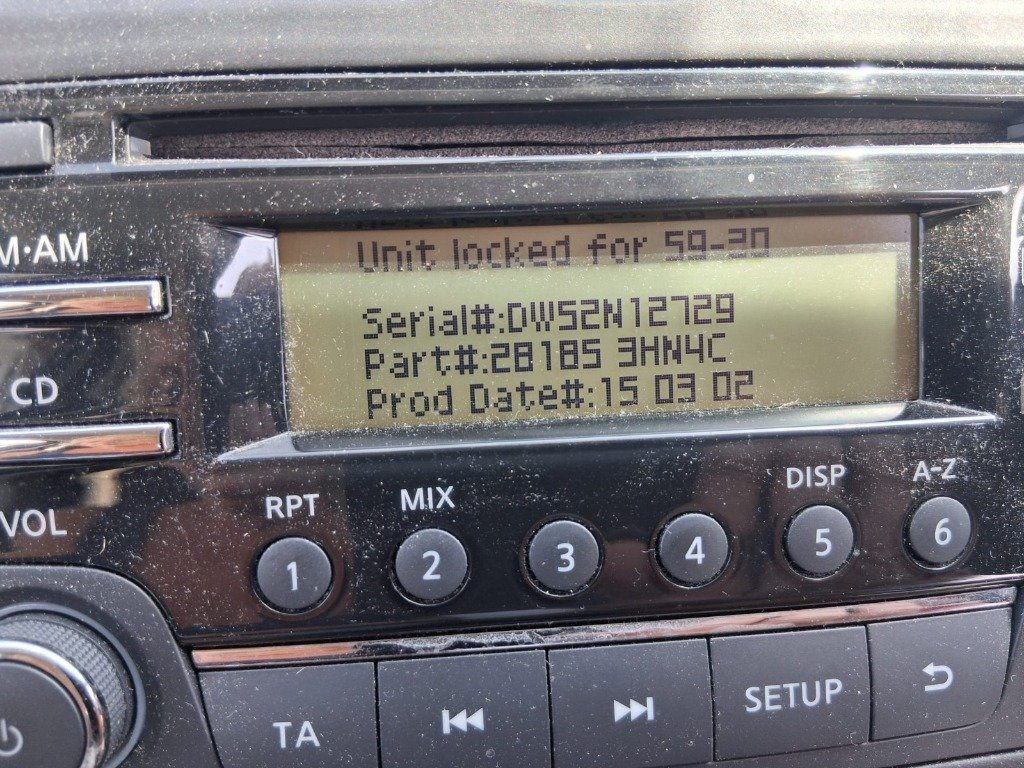
Copy Serial, Device & Date Values
Record the 7-digit Serial (e.g. 2783546), 10-digit Device (7513750018), or 10-character DW code (DW52N12729) displayed directly on your Qashqai console.

Enter Your 4-Digit Master PIN
Input your calculated 4-digit code using the touchscreen or preset buttons. Audio, navigation, and reversing cameras resume immediately.
Nissan Qashqai Radio Code Stereo Specifications
Our decoding system communicates with the official Nissan OEM authorization database. Review the technical parameters below to ensure complete compatibility with your head unit.
| Supported Models | Nissan Qashqai, Qashqai+2, Qashqai J10, Qashqai J11, Qashqai J12 |
|---|---|
| Fitted Headunits | Nissan Connect 1/2/3 Bosch, Daewoo AGC-0070RF, Clarion CY01E |
| Accepted Serials | 7-Digit Screen (9596739), DW (DW1CN...), CL (CL0816...) |
| Code Format | 4-Digit Manufacturer Security Master PIN |
| Delivery Time | Instant Automated Calculation (<60 Seconds) |

Nissan Qashqai Production Generations & Audio Systems
Identify your vehicle's exact generation, fitted factory audio unit, and whether dashboard removal is required to retrieve your serial number.

Qashqai J10 & J10+2 (MK1)

Qashqai J11 (MK2)
Complete Nissan Qashqai Radio Code & Security Guide
Recover your authentic Nissan Qashqai radio code in under 60 seconds. Guaranteed factory master PIN calculation for all Bosch Connect, Daewoo AGC, and Clarion systems.
Qashqai J10 & J11 Anti-Theft Battery Disconnect Lockout

Nissan Qashqai models feature an integrated vehicle security module tied directly to the CAN-bus architecture. Whenever the 12-volt battery is disconnected—such as during start-stop EFB/AGM battery replacement, routine alternator servicing, or jump-starting after a cold-weather discharge—the head unit automatically triggers anti-theft lockdown mode.
The center console display will immediately show "CODE", "RADIO CODE", or present a numeric input grid while silencing all cabin audio playback, disabling Bluetooth telephone hands-free calling, and pausing GPS navigation. Entering the genuine 4-digit factory master PIN immediately validates the hardware security handshake and restores all functionality permanently.
How to Display Your Qashqai Serial On-Screen Without Tools
Over 90% of Nissan Qashqai vehicles on the road are fitted with either the Nissan Connect touchscreen navigation system or the Daewoo single-CD Bluetooth audio unit. You do not need to pull the radio out of the dashboard or hire an auto-electrician to find your serial numbers.
Simply switch on your car ignition and turn the radio ON. Enter three random or incorrect codes in a row. The stereo firmware will temporarily lock and automatically display your 7-digit Serial Number (e.g. 9596739), 10-digit Device Number (e.g. 7612830076), and Date (e.g. 12.06.26) directly on the screen.
Step-by-Step Code Entry on Touchscreen vs Physical Bezel
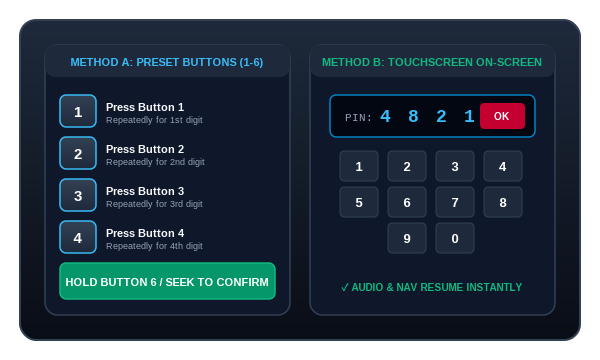
Once your authentic 4-digit unlock PIN has been computed by our automated system, inputting the code takes less than 30 seconds. On Nissan Connect touchscreens, tap each of the 4 digits directly on the virtual color keypad and press OK.
For physical button stereos (such as the Daewoo AGC-0070), press preset button 1 repeatedly until your first digit appears, button 2 for the second, button 3 for the third, and button 4 for the fourth. Once all four numbers are visible, press and hold preset button 6 or the rotary Enter dial for 2 seconds to confirm.
Troubleshooting Qashqai "WAIT 60 MIN" Lockout & Timer Reset
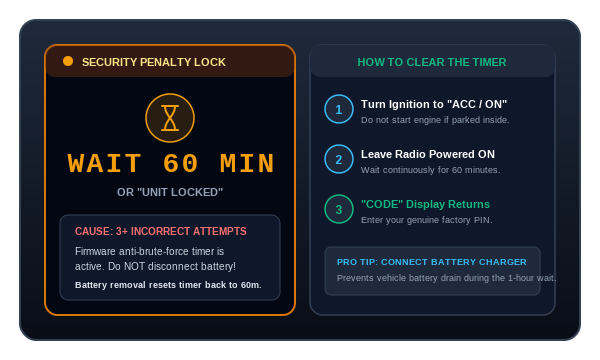
If someone previously attempted to guess the radio code, the internal anti-brute-force timer will freeze the unit with the message "WAIT 60 MIN" or "SYSTEM IS LOCKED". Do not disconnect the car battery! Disconnecting power will reset the internal timer back to zero, forcing you to wait all over again.
To clear the lockout, turn your ignition key to the Accessory (ACC) or ON position and keep the radio turned ON. Leave it completely untouched for 60 continuous minutes (or take an uninterrupted 1-hour road drive). Once the countdown expires, the prompt will return to "ENTER CODE".
Why Order Online Instead of Visiting a Nissan Main Dealer?
Traditional Nissan dealerships require booking an appointment several days in advance, driving to the dealership, presenting vehicle registration and V5 logbook ownership documents, and paying £35 to £65 ($50–$80) in diagnostic service fees. Our automated online service connects directly with factory databases to deliver the exact same original manufacturer PIN in under 60 seconds from the comfort of your home for just £9.99.
Nissan Qashqai On-Screen Error Diagnostics & Solutions
If your audio head unit displays a lock error, warning message, or countdown timer, refer to the diagnostic guide below.
| Error Message | Diagnostic Meaning | Recommended Action |
|---|---|---|
| RADIO CODE / ENTER CODE | Normal security prompt following battery power interruption. | Enter your 4-digit factory master PIN via touchscreen keypad or preset buttons 1–4. |
| INCORRECT PIN / CODE ERR | An invalid 4-digit code was entered into the unit. | Check your serial number carefully. Enter authentic manufacturer PIN on the next attempt. |
| WAIT 60 MIN / SYSTEM LOCKED | Anti-brute-force penalty active after 3 failed PIN attempts. | Leave vehicle ignition in ACC and radio powered ON for 60 continuous minutes. |
| SECURE (GREEN / RED BAR) | NATS immobilizer communication interruption or swapped unit. | Check the audio unit fuse in the driver footwell fuse box (15A Audio Fuse). |
Nissan Qashqai Radio Code FAQs
Answers to common questions about retrieving serial numbers and unlocking your Nissan Qashqai.
Select Another Nissan Model or Radio
We decode security codes for every Nissan vehicle, commercial van, and factory audio manufacturer.